• Picasso IA लोगो
    Logo Picasso IA
  • होम
  • AI इमेज
    Nano Banana 2
  • AI वीडियो
    Veo 3.1 Fast
  • AI चैट
    Gemini 3 Pro
  • इमेज एडिट करें
  • इमेज सुधारें
  • बैकग्राउंड हटाएं
  • टेक्स्ट टू स्पीच
  • इफ़ेक्ट्स
    NEW
  • पीढ़ियाँ
  • बिलिंग
  • सहायता
  • खाता
  1. संग्रह
  2. टेक्स्ट टू इमेज
  3. P Image Lora

क्रेडिटअपग्रेड

p-image-lora: LoRA-संचालित टेक्स्ट-टू-इमेज AI

p-image-lora एक टेक्स्ट-टू-इमेज मॉडल है जो LoRA fine-tuning पर आधारित है, जिसका मतलब है कि आपको एक जैसे सभी पर लागू होने वाले लुक तक सीमित नहीं रहना पड़ता। आप LoRA वेट्स का एक सेट लोड करते हैं जो आपकी मनचाही शैली या विषय से मेल खाता है — एक विशेष illustration style, एक character, एक product aesthetic — और मॉडल उस व्यक्तित्व को आपके लिखे किसी भी text prompt पर लागू कर देता है। यह फर्क वैसा है जैसे किसी सामान्य AI से "एक portrait" मांगना और ठीक वही visual language पाना जो आपके मन में थी. LoRA scale control वहीं है जहां असली fine-tuning होती है। इसे कम करें और शैली हल्के रूप में लागू होती है, जिससे आपका prompt खुलकर सामने आता है। इसे बढ़ाएं और LoRA पूरी तरह हावी हो जाता है। इसके अलावा, आप सात aspect ratios में से चुन सकते हैं — square social posts से लेकर लंबे portrait formats और चौड़े cinematic frames तक — या पूरी तरह कस्टम canvas size सेट कर सकते हैं। वैकल्पिक prompt upsampling पर्दे के पीछे आपके input को फिर से लिखता है ताकि छोटे या अस्पष्ट विवरणों से अधिक detail निकाली जा सके। यह मॉडल किसी भी creative workflow में स्वाभाविक रूप से फिट बैठता है जहां consistency महत्वपूर्ण होती है। Designers छवियों के पूरे batch में brand visual style को स्थिर रख सकते हैं। Illustrators हर बार शून्य से शुरू किए बिना character designs का prototype बना सकते हैं। अपना prompt टाइप करें, अपना LoRA चुनें, generate दबाएं — पूरी प्रक्रिया बस इतनी ही है। इसे अभी आज़माएं और देखें कि बड़े पैमाने पर आपकी शैली कैसी दिखती है।

आधिकारिक

3.5k रन

P Image Lora

2026-01-12

व्यावसायिक उपयोग

p-image-lora: LoRA-संचालित टेक्स्ट-टू-इमेज AI
विषय-सूची
  • अवलोकन
  • यह कैसे काम करता है
  • मुख्य विशेषताएं
  • अक्सर पूछे जाने वाले प्रश्न
  • क्रेडिट लागत
  • उपयोग के मामले
  • उदाहरण
Nano Banana Pro प्राप्त करें

अवलोकन

p-image-lora एक विशेषीकृत AI टेक्स्ट-टू-इमेज generation मॉडल है जो plain text prompts से अत्यधिक लक्षित visual outputs तैयार करने के लिए कस्टम LoRA (Low-Rank Adaptation) weights लागू करता है। जहां सामान्य image generators आपको औसत परिणाम देते हैं, यह मॉडल आपको community-trained या personally trained style adapters का उपयोग करने देता है जो आपके output की पूरी aesthetic को किसी विशेष look, character, या artistic direction की ओर मोड़ देते हैं। चाहे आप कोई designer हों जो किसी brand की visual identity से मेल बैठाना चाहते हों या कोई creator जो दर्जनों scenes में consistent character rendering चाहता हो, Picasso IA पर p-image-lora आपको बिना एक भी line of code लिखे वह precision देता है। यह diffusion-based generation की flexibility और वास्तविक creative projects द्वारा मांगी जाने वाली specificity के बीच एक व्यावहारिक पुल है।

यह कैसे काम करता है

  • आप एक text prompt लिखते हैं जो उस छवि का वर्णन करता है जिसे आप चाहते हैं, ठीक वैसे ही जैसे आप किसी standard AI text-to-image generation tool के साथ करते हैं। जितना अधिक वर्णनात्मक होगा, आपके शब्दों और अंतिम छवि के बीच उतना बेहतर alignment होगा।
  • आप एक LoRA चुनते हैं या निर्दिष्ट करते हैं — एक compact style या subject adapter जिसे एक focused dataset पर train किया गया होता है। ये adapters विशेष aesthetics, characters, या visual patterns को encode करते हैं जिन्हें base model अकेले लगातार पुन: उत्पन्न नहीं कर सकता।
  • मॉडल LoRA weights को base diffusion process के साथ fuse करता है, आपके prompt के semantic meaning को adapter में encode की गई stylistic direction के साथ blend करते हुए। यह सब background में अपने आप होता है।
  • आपको कुछ ही सेकंड में एक तैयार छवि मिलती है जो आपके prompt की content और चुने गए LoRA दोनों की visual fingerprint को दर्शाती है। कोई rendering queue नहीं, परिणामों के लिए मिनटों तक इंतजार नहीं — यहां instant results सामान्य बात हैं।
  • यदि output बिल्कुल सही नहीं है, तो आप prompt समायोजित करते हैं, LoRA बदलते हैं, या generation settings में बदलाव करके इसे फिर से चलाते हैं। iteration loop इतना तेज है कि perfect image ढूंढने में आमतौर पर कुछ ही प्रयास लगते हैं।

मुख्य विशेषताएं

  • LoRA-driven style control: यह अनुमान लगाने के बजाय कि कौन से prompt words शैली बदलेंगे, आप एक purpose-built adapter लागू करते हैं जो हर बार विश्वसनीय रूप से एक विशेष aesthetic को पुन: उत्पन्न करता है।
  • कोडिंग की आवश्यकता नहीं: पूरा workflow एक साफ interface के माध्यम से चलता है — कोई Python environment नहीं, configure करने के लिए कोई API keys नहीं, कोई command-line tools नहीं। यह वास्तव में non-technical users के लिए सुलभ है।
  • तेज़ generation speed: outputs मिनटों की बजाय सेकंडों में मिलते हैं, जिससे तेज creative iteration वास्तव में व्यावहारिक बनती है, निराशाजनक नहीं।
  • एक बढ़ती हुई LoRA library तक पहुंच: मॉडल adapters के एक curated, community-contributed collection से जुड़ता है जो art styles, characters, product aesthetics, और अधिक को कवर करता है — इसलिए आपको शायद ही कभी शून्य से शुरू करना पड़ता है।
  • Prompt और LoRA का परस्पर प्रभाव: आप अपने text prompt के माध्यम से image की content पर पूरा नियंत्रण बनाए रखते हैं, जबकि LoRA stylistic layer को स्वतंत्र रूप से संभालता है। ये दोनों inputs प्रतिस्पर्धा करने के बजाय एक-दूसरे पर जुड़ते हैं।
  • Consistent subject rendering: उन projects के लिए जिन्हें कई images में एक ही character या visual style को दोहराने की आवश्यकता होती है, LoRA adapters ऐसी repeatability प्रदान करते हैं जिसका मुकाबला केवल prompt-आधारित generation नहीं कर सकती।

अक्सर पूछे जाने वाले प्रश्न

क्या इसे उपयोग करने के लिए मुझे programming skills या technical knowledge की आवश्यकता है? नहीं — बस Picasso IA पर p-image-lora खोलें, अपनी मनचाही settings समायोजित करें, और generate दबाएं। interface पर्दे के पीछे सारी technical complexity संभाल लेता है, इसलिए आपका एकमात्र काम है जो आप चाहते हैं उसका वर्णन करना और अपनी vision के अनुरूप एक LoRA चुनना।

क्या इसे आज़माना मुफ्त है? हाँ, आप शुरुआत करने के लिए paid account बनाए बिना p-image-lora को मुफ्त में online चला सकते हैं। free access आपको images generate करने और अलग-अलग LoRAs के साथ प्रयोग करने देता है ताकि आप किसी प्रतिबद्धता से पहले मॉडल की output quality का मूल्यांकन कर सकें।

परिणाम मिलने में कितना समय लगता है? generation आमतौर पर कुछ सेकंड में पूरी हो जाती है, यह आपके prompt की complexity और उपयोग में लिए जा रहे specific LoRA पर निर्भर करता है। यह speed कई variations को लगातार चलाना व्यावहारिक बनाती है, जब तक कि आपको ठीक वही image न मिल जाए जो आपके मन में थी।

क्या मैं output quality या style को customize कर सकता हूँ? बिल्कुल। आप content को अपने text prompt के माध्यम से नियंत्रित करते हैं और stylistic direction को LoRA adapter की अपनी पसंद के माध्यम से। अतिरिक्त generation parameters आपको detail level और prompt के प्रति adherence जैसी बातों को fine-tune करने देते हैं, जिससे अंतिम output पर सार्थक नियंत्रण मिलता है।

अगर मैं परिणाम से खुश न होऊं तो क्या होगा? बस अपने prompt में संशोधन करें, कोई दूसरा LoRA आज़माएं, या generation settings समायोजित करें और मॉडल को फिर से चलाएं। क्योंकि परिणाम जल्दी वापस आ जाते हैं, इसलिए संतोषजनक image तक पहुंचने की iteration एक महंगी प्रक्रिया के बजाय तेज प्रक्रिया बन जाती है।

मैं outputs का उपयोग कहां कर सकता हूँ? p-image-lora से बनाई गई images का उपयोग personal और commercial creative projects की एक विस्तृत श्रृंखला में किया जा सकता है, social media content और concept art से लेकर product mockups और editorial illustration तक। हमेशा उस specific LoRA adapter से संबंधित terms की समीक्षा करें जिसका आप उपयोग करते हैं, क्योंकि individual adapters की अपनी usage conditions हो सकती हैं।

मैं मॉडल को कितनी बार चला सकता हूँ? आप अपने current plan की सीमाओं के भीतर p-image-lora को जितनी बार चाहें चला सकते हैं। experimentation पर कोई hard cap नहीं है — मॉडल को iterative use के लिए बनाया गया है, इसलिए image को refine करने के लिए इसे दर्जनों बार चलाना एक सामान्य और अपेक्षित workflow है।

अभी p-image-lora के साथ generation शुरू करें और देखें कि सही prompt के साथ जोड़ा गया सही LoRA वास्तव में क्या बना सकता है।

क्रेडिट लागत

प्रत्येक जेनरेशन 1 क्रेडिट का उपयोग करता है

1 क्रेडिट
या 5 क्रेडिट्स 5 जेनेरेशन के लिए

उपयोग के मामले

साधारण टेक्स्ट में किसी character का वर्णन करें और एक matching LoRA लोड करें ताकि हर छवि को हाथ से दोबारा paint किए बिना कई scenes में consistent portraits बनाए जा सकें।

एक product description टाइप करें और साफ, studio-style LoRA लागू करें ताकि e-commerce listing के लिए तैयार white-background mockup images बनाई जा सकें।

एक छोटा scene prompt लिखें और prompt upsampling का उपयोग करके इसे अपने आप एक detailed image में विस्तारित करें, बिना prompt को स्वयं दोबारा लिखे।

एक illustration-style LoRA लोड करें और text descriptions से social media graphics की एक श्रृंखला बनाएं, जिन सबकी visual identity एक जैसी हो।

Instagram या Pinterest के लिए outfit descriptions से vertical editorial images बनाने हेतु 9:16 aspect ratio और fashion-focused LoRA सेट करें।

अंतिम version पर निर्णय लेने से पहले जल्दी से तुलना करने के लिए उसी prompt के साथ तीन अलग-अलग lora_scale values का उपयोग करें कि किसी style को कितनी मजबूती से लागू किया जाना चाहिए।

एक script excerpt से cinematic 16:9 scene concepts बनाएं, इसके लिए film-grain LoRA को एक detailed scene description के साथ मिलाएं।

उदाहरण

Act1vate! A child running through a field of wildflowers with the sun behind them.
1.5s
उदाहरण देखें
class1cpa1nt Hyperrealism painting depicting a beautiful woman with long blonde hair, blue eyes, and a smile, wearing a red dress, sitting on a chair in a room with a window and a table with a flower vase and a book.
4.9s
उदाहरण देखें
tok_comic_noir A towering, menacing gray mech with red eyes dominates the cityscape, its colossal form walking forward with arms slightly bent at the elbows, hands open as if crushing something. The mech has intricate armor plating, visible seams, and panels, with hints of blue in its metallic surface. Red glowing elements are visible on its chest, shoulders, and head. It has two large antennas on its head. The background features a vibrant orange and red sky with an old comic book halftone pattern effect, filled with stylized clouds and explosions, indicating an ongoing conflict. Several tall buildings, some partially obscured by the mech, line the horizon. Below, the street is in disarray, with three detailed cars in various states of distress, one heavily damaged two-door sedan at the right, one slightly damaged four-door grey sedan just left of center with its lights on, and another four-door car at the left, facing towards the left. Debris and smoke rise from the ground, further emphasizing the destruction. The overall style is reminiscent of a retro comic book, with thick, bold linework, dramatic lighting, and a limited color palette focused on reds, grays, and oranges, conveying a sense of urgency and chaos.
5.6s
उदाहरण देखें
t3chnic4lly A couple dancing in a ballroom with soft lighting and period costumes.
5.6s
उदाहरण देखें
A color pencil sketch of a woman with flowing hair sitting by a window with plants.
7.5s
उदाहरण देखें
DADADOLL style A portrait with fragmented planes and cubist influences.
1.5s
उदाहरण देखें
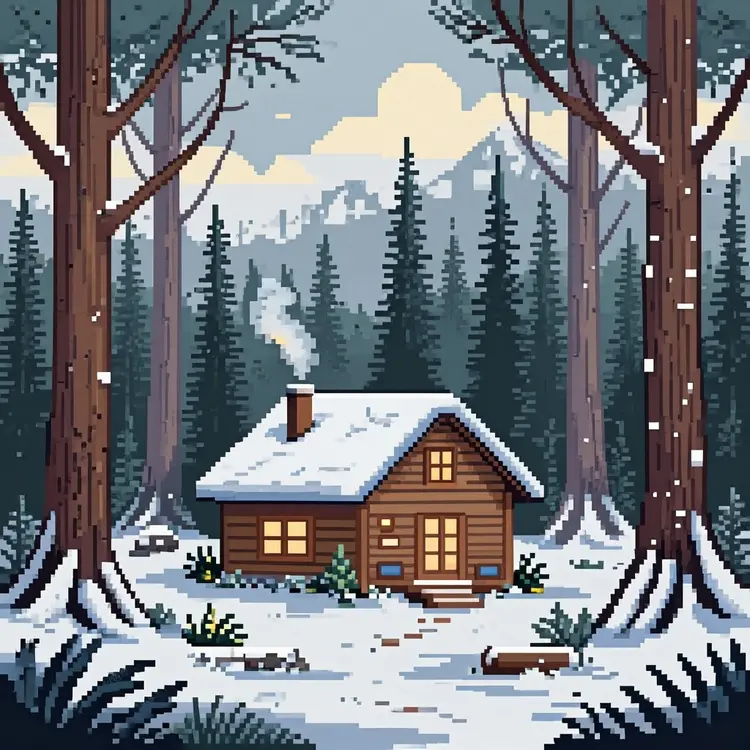
pixel art style A cozy cabin in a snowy forest with smoke from the chimney.
4.1s
उदाहरण देखें
Realism A realistic photo portrait of a young woman with curly dark hair and green eyes, laughing gently in natural window light, wearing a soft blue sweater.
6.2s
उदाहरण देखें

श्रेणी बदलें

इफेक्ट्स

टेक्स्ट से इमेज

टेक्स्ट से इमेज

टेक्स्ट से वीडियो

बड़े भाषा मॉडल

बड़े भाषा मॉडल

टेक्स्ट से स्पीच

टेक्स्ट से स्पीच

सुपर रेजोल्यूशन

सुपर रेजोल्यूशन

लिपसिंक

AI संगीत निर्माण

AI संगीत निर्माण

वीडियो संपादन

स्पीच से टेक्स्ट

स्पीच से टेक्स्ट

AI वीडियो एन्हांस

बैकग्राउंड हटाएँ

बैकग्राउंड हटाएँ